
Document Properties
Table Of Contents
- Component Declaration in the Right NgModule
- No Use of NgRx or Services in Components
- Delegation of Complex Component Logic to Services
- Minimal Logic in Constructor
- Property Binding for Dynamic Values
- No Manual Unsubscribing
- No Duplicate Subscriptions in Templates
- Flattening Nested
@ifBlocks - OnPush Change Detection
- DOM Manipulations
- Component Splitting
- Mocking Facades in Tests
Component Declaration in the Right NgModule
Angular requires you to declare a component in one and only one NgModule.
Find the right one in the following order:
Is your component used only on one page? - Add it to the declarations of the corresponding page.module.
Is your component used on multiple pages? - Declare it in the shared.module and also export it there.
Is your component used in the application shell (and possibly on certain pages as well)? - Declare it in the shell.module and also export it there.
(Advanced) Does your component relate to a specific B2B extension? - Declare it in that extension module and add it as an entryComponent, add a lazy-loaded component, and add that to the extension exports, which are then imported/exported in the shared.module.
When using ng generate, the right module should be found automatically.
No Use of NgRx or Services in Components
Using NgRx or Services directly in components violates our model of abstraction.
Use only facades in components, as they provide the simplest access to the business logic.
Delegation of Complex Component Logic to Services
There should not be any string or URL manipulation, routing mapping, or REST endpoint string handling within components.
This is supposed to be handled by methods of services.
See also the Angular Style Guide.
Minimal Logic in Constructor
Put as little logic into constructor as possible; use ngOnInit instead.
See The essential difference between Constructor and ngOnInit in Angular and Angular constructor versus ngOnInit.
Property Binding for Dynamic Values
Use property binding to bind dynamic values to attributes or properties.
See Binding of dynamic properties and attributes.
There are often two ways to bind values dynamically to attributes or properties: interpolation or property binding.
In the PWA, we prefer using property binding since this covers more cases in a consistent way, resulting in more consistent code.
There is an exception for direct string value bindings where we use, for example, routerLink="/logout" instead of [routerLink]="'/logout'".
Pattern to avoid
<div attr.data-testing-id="category-{{category.id}}">
  <img src="{{base_url + category.images[0].effectiveUrl}}" />
</div>
Correct pattern
<div [attr.data-testing-id]="'category-' + category.id">
  <img [src]="base_url + category.images[0].effectiveUrl" />
</div>
No Manual Unsubscribing
Do not unsubscribe; use the takeUntilDestroyed operator instead.
Following the ideas of the article takeUntilDestroyed in Angular v16, the following pattern is used for ending subscriptions to observables that are not handled via async pipe in the templates.
'unsubscribe' via takeUntilDestroyed
export class AnyComponent implements OnInit {
  ...
  ngOnInit() {
    ...
    observable$.pipe(takeUntilDestroyed(this.destroyRef))
      .subscribe(/* ... */);
  }
}
The ESLint rule rxjs-angular/prefer-takeuntil enforces the usage of takeUntilDestroyed when subscribing in an Angular artifact.
No Duplicate Subscriptions in Templates
Each | async pipe in a template creates its own subscription.
If the same observable is piped through async more than once in positions that are rendered at the same time, the pipe subscribes multiple times unnecessarily.
Use the Angular @let declaration to resolve the value once and then reuse it.
Declare the @let variable in the nearest shared parent scope, before its first use.
Pattern to avoid
@if (!!(error$ | async) === false) { ... }
<ish-error-message [error]="error$ | async" />
Correct pattern
@let error = error$ | async;
@if (!!error === false) { ... }
<ish-error-message [error]="error" />
Multiple | async pipes in mutually exclusive @if/@else branches or in separate @switch cases are already only subscribed once at runtime, so hoisting them is a readability choice rather than a subscription optimization.
Flattening Nested @if Blocks
@let is also useful to flatten nested @if blocks that only exist to unwrap and null-check an async value.
Note that the resolved value can be null, so use optional chaining when accessing its properties:
Pattern to avoid
@if (products$ | async; as products) {
  @if (products.length) {
  <!-- ... -->
  }
}
Correct pattern
@let products = products$ | async;
@if (products?.length) {
<!-- ... -->
}
OnPush Change Detection
To reduce the number of ChangeDetection computation cycles, all components should have their Component decorator property changeDetection set to ChangeDetectionStrategy.OnPush.
DOM Manipulations
When using Angular, avoid accessing or changing the DOM directly, as this may lead to several issues:
- If you use direct DOM accessors such as window, document etc., they might not refer to anything relevant in server-side code.
- It can expose your app to XSS injection attacks or other security issues.
- The Angular synchronization of components and views are bypassed, which can lead to unwanted side effects.
If you need to manipulate the DOM, use the multiple DOM manipulation methods of the Angular Renderer2 API or the PWA DomService or other Angular techniques.
Component Splitting
Consider splitting one into multiple components when:
-
Size: Component code becomes too complex to be easily understandable
-
Separation of concerns: A component serves different concerns that should be separated
-
Reusability: A component should be reused in different contexts. This can introduce a shared component that could be placed in a shared module.
-
Async data: Component relies on async data from the store, making the component code unnecessarily complex. In that case, use a container component that resolves the observables outside the child component and passes data in via property bindings. Do not do this for simple cases.
Single-use dumb components are always okay if it improves readability.
Mocking Facades in Tests
Angular artifacts such as components, directives, and pipes should solely depend on facades to interact with the State Management.
This is enforced with the ESLint rule no-intelligence-in-artifacts, which rejects any usage of REST API services and NgRx artifacts.
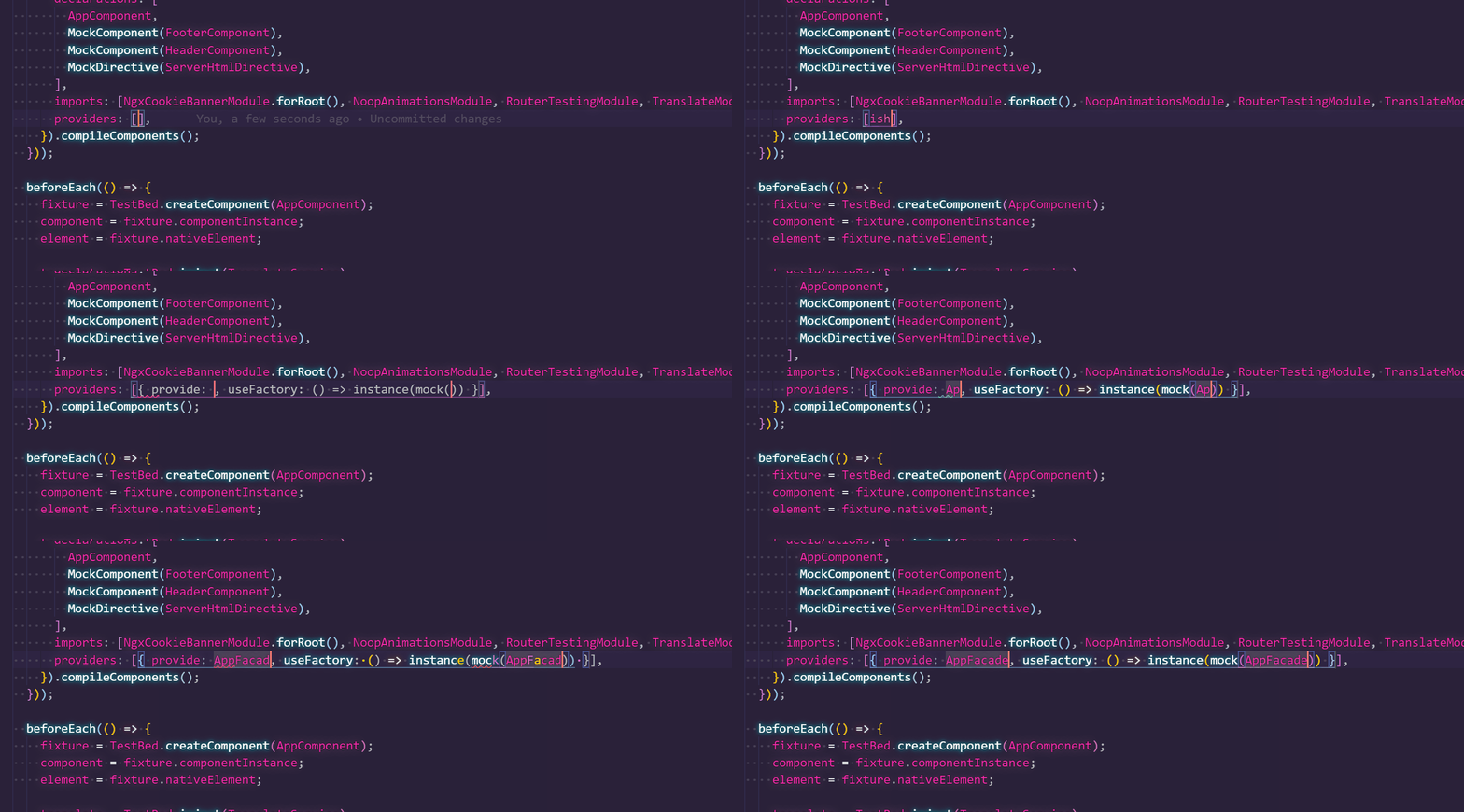
Use ts-mockito for creating and managing these mocks.
Providers for facades can easily be added by using the VSCode snippet ish-provider-ts-mockito:
Disclaimer
The information provided in the Knowledge Base may not be applicable to all systems and situations. Intershop Communications will not be liable to any party for any direct or indirect damages resulting from the use of the Customer Support section of the Intershop Corporate Website, including, without limitation, any lost profits, business interruption, loss of programs or other data on your information handling system.