
Document Properties
Table Of Contents
Overview
The PWA provides a component with the selector ish-payment-paypal that dynamically loads the PayPal SDK and renders the appropriate PayPal component based on the configured adapter type and page type.
The component supports:
- Buttons: PayPal checkout buttons for standard payments
- Messages: Pay Later messaging for promotional content
- CardFields: Hosted card input fields for credit card payments
- GooglePay: Google Pay button and functionality
- ApplePay: Apple Pay button and functionality
Prerequisites
To use PayPal payment methods in the Intershop PWA, ensure that the following prerequisites are met:
- The Intershop PayPal Complete Payments Service Connector (PPCP Connector) version 3 is installed and configured in Intershop Commerce Management.
- The PayPal Common Configuration Service is configured in Intershop Commerce Management, and the onboarding process has been successfully completed.
- The PayPal payment methods are activated and configured in Intershop Commerce Management.
Version Dependency for PayPal
| Component | Version |
|---|---|
| Intershop (PPCP Connector) for Messages, PayPal Checkout and Credit Card | > 3.0.0 |
| Intershop (PPCP Connector) to apply Google Pay and Apple Pay | > 3.1.0 |
| ICM | > 14.2.2 |
| Google Pay JS API | 2.0 |
| Apple Pay JS API | 4 |
Architecture
The PayPal integration follows a modular architecture with clear separation of concerns:
src/app/core/utils/paypal/
├── adapters/
│   ├── paypal-buttons/                 # PayPal Buttons adapter
│   ├── paypal-card-fields/             # PayPal Card Fields adapter
│   ├── paypal-messages/                # PayPal Pay Later Messages adapter
│   ├── paypal-google-pay/              # PayPal Google Pay adapter
│   ├── paypal-apple-pay/               # PayPal Apple Pay adapter
│   ├── paypal-adapters.builder.ts      # Factory for creating adapters
│   └── paypal-adapters.styling.ts      # Centralized styling configuration
├── paypal-config/
│   └── paypal-config.service.ts        # SDK loading and configuration
├── paypal-data-transfer/
│   └── paypal-data-transfer.service.ts # Data communication service
└── paypal-model/
    └── paypal.model.ts                 # PayPal SDK interfaces
Key Building Blocks
| Component | Purpose |
|---|---|
PaymentPaypalComponent |
Main Angular component for rendering PayPal elements |
PaypalAdaptersBuilder |
Factory service that creates appropriate PayPal SDK adapters |
PaypalConfigService |
Handles SDK script loading and URL construction |
PaypalCardFieldsAdapter |
Representation of the PayPal SDK Card Fields object, responsible for rendering PayPal card fields and handling the associated callbacks |
PaypalButtonsAdapter |
Representation of the PayPal SDK Buttons object, responsible for rendering PayPal buttons and handling the associated callbacks |
PaypalMessagesAdapter |
Representation of the PayPal SDK Messages object, responsible for rendering PayPal Pay Later messages |
PaypalGooglePayAdapter |
Representation of the PayPal SDK Google Pay object, responsible for rendering PayPal Google Pay button and handling the associated callbacks |
PaypalApplePayAdapter |
Representation of the PayPal SDK Apple Pay object, responsible for rendering PayPal Apple Pay button and handling the associated callbacks |
Adapter Types
The ish-payment-paypal component supports different adapter types:
- Buttons
- Messages
- CardFields
- GooglePay
- ApplePay
Buttons
This adapter type is used to display PayPal checkout buttons for both standard and express payments.
The rendering is performed by the PayPalButtonsAdapter.
This component also provides the callback methods that are required by the PayPal JavaScript SDK Buttons API.
To use the ish-payment-paypal component with the Buttons adapter type:
- Set the
adapterTypeinput toButtons. - The
pageTypeis required to apply the appropriate SDK styling options. - Specify the
selectedPaymentMethodso that the component can load the correct SDK for PayPal Buttons.
The following example shows how to integrate ish-payment-paypal for the corresponding adapter type Buttons into any component:
<ish-payment-paypal [selectedPaymentMethod]="paypalPaymentMethod" adapterType="Buttons" pageType="cart" />Messages
This adapter type is used to display Pay Later messaging on various pages (home, category, product details, cart, checkout) based on the configuration in Intershop Commerce Management.
The rendering is performed by the PaypalMessagesAdapter.
It is not necessary to set the adapterType input for messages, as it is the default type when no adapterType is provided.
However, the pageType input is required to apply the appropriate SDK styling options and to determine the visibility of Pay Later messages based on the configuration in Intershop Commerce Management.
The following example shows how to integrate ish-payment-paypal for the corresponding adapter type Messages into any component:
<ish-payment-paypal pageType="home" />CardFields
This adapter type is used to provide card input fields for direct credit/debit card payments (Advanced Card Payments).
The rendering is performed by the PaypalCardFieldsAdapter.
This component also provides input validation, error handling, and the callback methods that are required by the PayPal JavaScript SDK Buttons API.
The following example shows how to integrate ish-payment-paypal for the corresponding adapter type CardFields into any component:
<ish-payment-paypal [selectedPaymentMethod]="paymentMethod" adapterType="CardFields" pageType="checkout" />GooglePay
This adapter type is used to provide the Google Pay button and the corresponding functionality.
The rendering is performed by the PaypalGooglePayAdapter.
This component also provides the callback methods that are required by the PayPal JavaScript SDK Google Pay API.
Google Pay Payment Flow
When the user authorizes a payment in the Google Pay sheet, the onPaymentAuthorizedCallback method handles the following flow:
- ICM Order Creation: Initiates order creation in Intershop Commerce Management
- PayPal Order Confirmation: Confirms the order with PayPal using the Google Pay payment data
- 3D Secure Handling: If Strong Customer Authentication (SCA) is required (
PAYER_ACTION_REQUIRED), theinitiatePayerAction()method is called to display the 3DS authentication iframe. - Order Completion: Continues with ICM order creation regardless of the PayPal confirmation result, as the Commerce Management handles the final payment state
The following example shows how to integrate ish-payment-paypal for the corresponding adapter type GooglePay into any component:
<ish-payment-paypal adapterType="GooglePay" pageType="checkout" [selectedPaymentMethod]="paypalMethod" />Google Pay Production Checklist
Before going live with Google Pay, ensure the following requirements are met:
| Requirement | Description |
|---|---|
| HTTPS | SSL certificate must be configured on your domain |
| PayPal Live Credentials | Production Client ID and Merchant ID from PayPal |
| Google Merchant ID | Obtained from Google Pay & Wallet Console (free registration required) |
| PayPal Production Onboarding | Complete PayPal Production Onboarding (free registration required) |
| Google Review | Integration approved by Google |
| Domain Verification | Domain must be verified with Google |
| Intershop Commerce Management (ICM) | Commerce Management must be configured with production credentials |
Note
The environment parameter for the Google Pay PaymentsClient defaults to 'TEST'.
For a live system, this must be explicitly set to 'PRODUCTION'.
You can configure this via the PWA environment parameter paypalClientConfig.googlePayEnvironment.
Example for the specification of the paypalClientConfig configuration via environment file:
 paypalClientConfig: {
   googlePayEnvironment: 'PRODUCTION',
 },
ApplePay
This adapter type is used to provide the Apple Pay button and the corresponding functionality.
The rendering is performed by the PaypalApplePayAdapter.
This component also provides the callback methods that are required by the PayPal JavaScript SDK Apple Pay API.
Apple Pay Payment Flow
When the user clicks the Apple Pay button, the onApplePayButtonClicked method initiates the following flow:
- ICM Order Creation: Initiates order creation in Intershop Commerce Management asynchronously
- ApplePaySession Creation: Creates the
ApplePaySessionsynchronously from the user gesture (required by Apple Pay) - Merchant Validation: The
onvalidatemerchantcallback validates the merchant with PayPal using the validation URL. - Payment Authorization: The
onpaymentauthorizedcallback confirms the order with PayPal using the Apple Pay token and billing contact data. - Order Completion: Continues with ICM order creation and completes the Apple Pay session with success or failure status
- Cancellation Handling: If the user cancels the Apple Pay sheet, the
oncancelcallback triggers ICM order creation cleanup to remove the pending order.
The following example shows how to integrate ish-payment-paypal for the corresponding adapter type ApplePay into any component:
<ish-payment-paypal adapterType="ApplePay" pageType="checkout" [selectedPaymentMethod]="paypalMethod" />Domain Verification
Apple Pay requires domain verification to ensure that only authorized domains can process Apple Pay transactions.
This is accomplished by serving an Apple domain association file at the /.well-known/apple-developer-merchantid-domain-association path.
The /.well-known/ directory is a standardized location on web servers (defined by RFC 8615) used to host site-wide metadata files.
The domain verification file is provided by PayPal during the merchant onboarding process and must be accessible from the PWA's root domain.
For detailed instructions on how to configure the PWA to serve well-known files, see the Well-Known Resources Guide.
Page Types
The page type is required for various processes:
- URL parameter: The page types are required as script loader URL parameter
data-page-type. - Styling: Page types allow you to apply different styles to the component.
- Pay Later handling: The page type is also used to determine the visibility of Pay Later messages and buttons, which can be configured separately for each page type in Intershop Commerce Management.
Styling Customization
This section explains how to style PayPal components in the Intershop PWA using the styling options provided by the PayPal JavaScript SDK.
All styling configurations are located in paypal-adapters.styling.ts.
Pay Later Message Styling
The styling of PayPal messages depends on the page type.
// This example shows the Pay Later messages styling for the component with pageType `home`.
export const PAYPAL_MESSAGE_STYLING = {
  home: { layout: 'flex', color: 'white-no-border', ratio: '20x1' },
  ...
};
Script Loading
Depending on the configured adapter type, the PayPal integration dynamically loads the appropriate SDK instance with the necessary parameters (e.g., client-id, merchant-id, currency, locale, intent) via the PaypalConfigService.
Since the PayPal SDK URL parameters can differ for each payment method, the script URL is loaded with a unique namespace to avoid conflicts when multiple instances are required.
The namespace format is PPCP_<payment_method_id> for Buttons and CardFields, and PPCP_MESSAGES for Pay Later Messages.
// Namespace format: PPCP_<payment_method_id> or PPCP_MESSAGES
const paypalObject = window['PPCP_FAST_CHECKOUT'];
Loading is handled by the PaypalConfigService, which constructs the SDK URL with necessary parameters and uses the ScriptLoaderService to load the script dynamically.
The ScriptLoaderService is a core utility service for dynamically loading external JavaScript files into the DOM.
It provides the following features:
- Caching: Prevents duplicate script loading by maintaining caches for loaded and currently loading scripts
- Namespace support: Uses
data-namespaceattributes as cache keys to handle scripts with dynamic URLs (e.g., PayPal SDK URLs that change with locale/currency) - Script attributes: Supports
type,integrity,crossorigin, and custom data attributes - Observable-based API: Returns an
Observable<ScriptType>for tracking load status
Pay Later Configuration
The visibility of Pay Later messages or Pay Later buttons is controlled by the settings of the PayPal Common Configuration Service in Intershop Commerce Management.
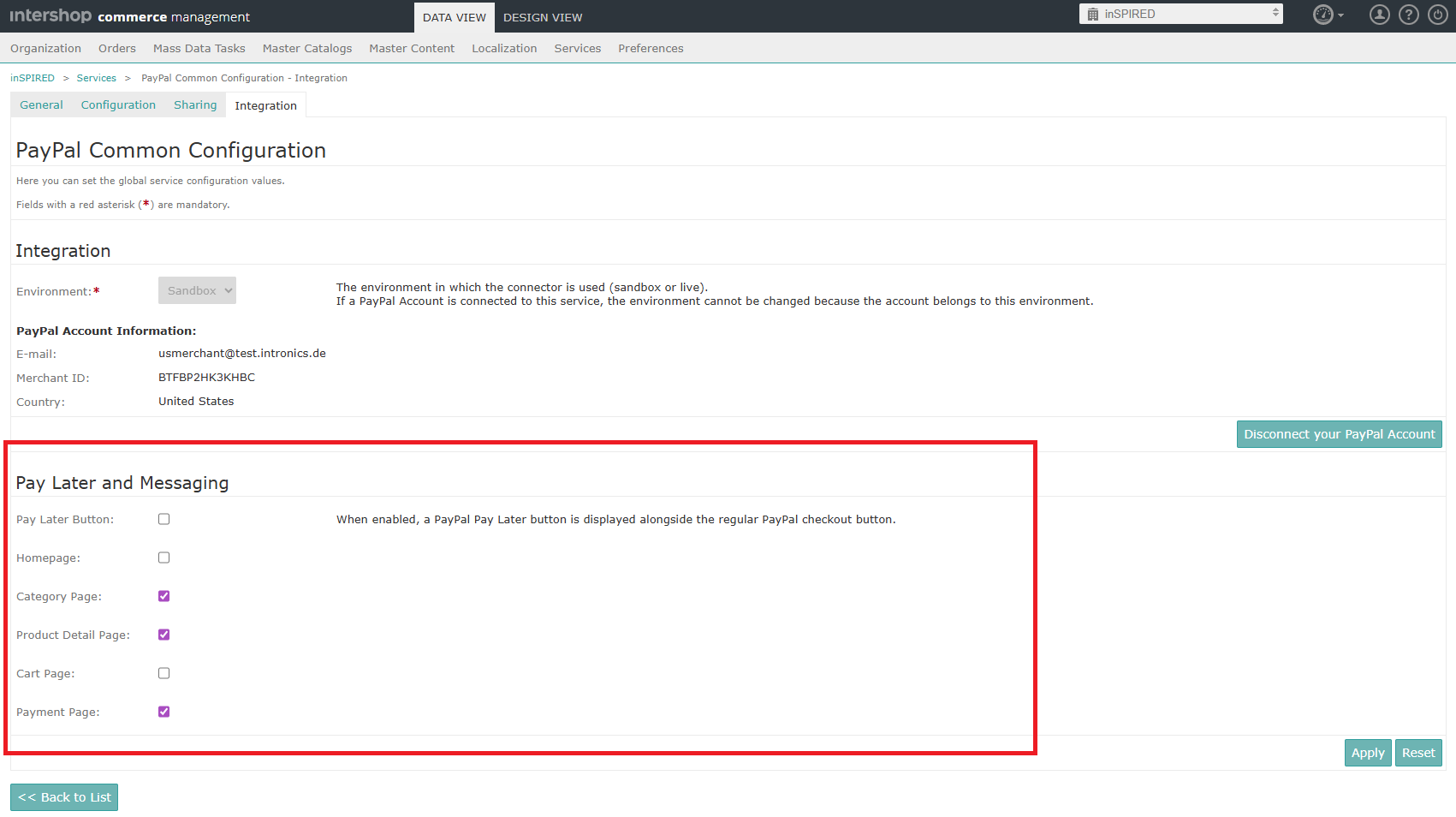
The PayPal configuration is retrieved from Intershop Commerce Management via the configurations endpoint.
The following example shows how to integrate the PayPal component on the product detail page to display Pay Later messages if Intershop Commerce Management settings are to be taken into account:
@if ('payment.paypal.payLaterPreferences.PayLaterMessagingProductDetailsEnabled' | ishServerSetting) {
<ish-payment-paypal [pageType]="'product-details'" />
}
Further References
Disclaimer
The information provided in the Knowledge Base may not be applicable to all systems and situations. Intershop Communications will not be liable to any party for any direct or indirect damages resulting from the use of the Customer Support section of the Intershop Corporate Website, including, without limitation, any lost profits, business interruption, loss of programs or other data on your information handling system.